

When you’re choosing a bag for your laptop, you’ve probably come across the term “laptop compartment.” But what does it really mean, and why should you care? Your laptop is one of your most valuable tools, whether for work, school, or personal use.
Protecting it from bumps, scratches, and drops is essential. That’s where the laptop compartment comes in—it’s designed specifically to keep your device safe and secure inside your bag. You’ll discover exactly what a laptop compartment is, why its design matters, and how to pick the right one for your needs.
Keep reading to make sure your laptop gets the protection it deserves every time you’re on the move.
Laptop Compartments Basics
The laptop compartment is a special section inside a bag or backpack. It keeps your laptop safe and secure during travel or daily use. Understanding the basics of laptop compartments helps you choose the right bag. This section covers the purpose, common features, and size considerations of laptop compartments.
Purpose And Importance
The main purpose of a laptop compartment is to protect your device. It shields the laptop from bumps, scratches, and drops. A good compartment keeps the laptop separate from other items. This reduces damage risk and keeps your laptop clean. It also makes carrying your laptop easier and more comfortable.
Common Features
Laptop compartments usually have padding to absorb shocks. Many compartments include soft linings to prevent scratches. Some have straps or Velcro to hold the laptop in place. Water-resistant materials help protect against spills. Pockets for chargers and accessories are common too. These features increase the safety and convenience of carrying your laptop.
Size And Fit Considerations
Choosing the right size compartment is important. The laptop should fit snugly without forcing it in. A loose fit can cause the laptop to move and get damaged. Measure your laptop’s width, height, and depth before buying. Some bags offer compartments for different laptop sizes. Make sure the compartment matches your laptop model for best protection.
Types Of Laptop Compartments
Laptop compartments come in different styles. Each type offers unique protection and convenience. Choosing the right one helps keep your laptop safe and easy to carry.
Understanding these types makes shopping for a laptop bag simpler. Some compartments focus on cushioning, while others improve security or accessibility.
Padded Compartments
Padded compartments have extra foam or soft material inside. This padding cushions your laptop from bumps and drops. It reduces the risk of scratches and damage. Most laptop bags include padded compartments as a basic feature. They work well for daily use and short trips.
Suspended Sleeves
Suspended sleeves lift the laptop off the bag’s bottom. This design protects the laptop from impacts when the bag is set down hard. The sleeve is attached inside the bag but does not touch the base. Suspended sleeves add an extra layer of safety that padded compartments may miss.
Separate Vs Integrated Compartments
Separate compartments are independent pockets inside the bag. They close with zippers or flaps and keep the laptop apart from other items. This helps avoid scratches from keys or pens.
Integrated compartments are part of the main bag space. They may have padding but do not fully separate the laptop. Integrated designs save space and keep the bag slim. Separate compartments offer better protection but can make the bag bulkier.

Laptop Bags And Cases
Laptop bags and cases are essential for carrying and protecting laptops. They come in various styles to suit different needs and preferences. Each type offers a unique way to secure your laptop safely while making transport easy.
Choosing the right laptop bag or case depends on how you use your laptop and your daily routine. Some bags focus on professional looks, while others emphasize comfort or minimalism. Understanding the main types helps you pick the best option.
Briefcase Style Bags
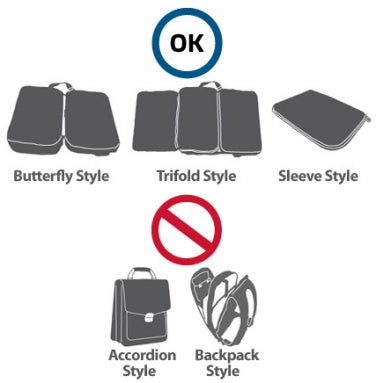
Briefcase style bags are classic and professional. They often have a padded laptop compartment to keep your device safe. These bags usually feature multiple pockets for documents and accessories. Their slim design fits well in formal settings and offices.
Backpacks With Compartments
Backpacks with laptop compartments offer comfort and convenience. These bags have dedicated padded sections to protect laptops from bumps. They allow hands-free carrying and usually have extra space for books and chargers. Ideal for students and travelers who carry more items.
Laptop Sleeves And Covers
Laptop sleeves and covers provide lightweight protection. They are slim and easy to carry inside other bags. Sleeves often have padding to shield against scratches and minor impacts. These cases are perfect for those who prefer minimal bulk and simple protection.

Protection And Safety
The laptop compartment plays a vital role in protecting your device. It keeps your laptop safe from daily hazards. Protection and safety features reduce the risk of damage during travel or storage. These features ensure your laptop stays intact and lasts longer. Let’s explore key protection elements found in good laptop compartments.
Impact And Scratch Resistance
A quality laptop compartment has padding to absorb impacts. This padding shields your device from bumps and drops. It also prevents scratches from keys or other objects. Materials used are often tough and durable. This helps maintain your laptop’s appearance and function.
Water Resistance Features
Water resistance protects your laptop from spills and rain. Many compartments use waterproof fabrics or coatings. This stops water from seeping inside. Water-resistant zippers add extra protection. These features give peace of mind in wet conditions.
Shock Absorption Technology
Shock absorption reduces damage from sudden shocks or falls. Special foam or gel layers soften blows to the laptop. Some compartments use suspended designs to keep laptops off the bag’s base. This technology minimizes impact forces. It helps safeguard delicate internal parts of the laptop.
Choosing The Right Compartment
Choosing the right laptop compartment is key for your device’s safety and convenience. It helps keep your laptop secure and easy to carry. A well-fitted compartment prevents damage during travel or daily use. Consider different factors to find the best fit for your needs. This section will guide you through important points to consider when selecting a laptop compartment.
Matching Laptop Size
Measure your laptop’s length, width, and thickness before buying a bag. The compartment should fit your laptop snugly without being too tight. A loose compartment lets the laptop move, causing scratches or damage. Oversized compartments waste space and reduce protection. Check the manufacturer’s size recommendations for accuracy. Proper size matching keeps your laptop stable and safe.
Travel And Usage Needs
Think about how often and where you will carry your laptop. For daily use, choose compartments with quick access. For frequent travelers, padded compartments with extra protection work best. Some compartments have water-resistant or shockproof features. Consider compartments with additional pockets for chargers and accessories. Your travel habits define the type of compartment you should choose.
Weight And Portability
Lightweight compartments reduce the overall weight of your bag. This makes carrying your laptop easier and less tiring. Choose materials that offer good protection but stay light. Compact compartments add to bag portability, especially for long commutes. Avoid bulky compartments if you travel light or need to move fast. Balance protection with ease of carrying for the best experience.


Innovations In Laptop Storage
Innovations in laptop storage have improved how we carry and protect our devices. Modern laptop compartments focus on safety, ease of use, and style. These advancements meet the needs of daily commuters and travelers alike.
Designers now prioritize the laptop compartment as a main feature. Many bags use new materials and smart layouts. These changes make laptops easier to carry and keep safe.
Laptop-first Construction
Bags built with laptop-first construction place the device at the center. This method ensures the laptop fits perfectly inside its compartment. It reduces movement and protects against shocks and drops. The compartment often has extra padding and a snug fit. This design keeps laptops secure during travel or daily use.
Smart Organizational Features
New laptop compartments include smart organizational features. Pockets, dividers, and sleeves help store chargers, cables, and accessories neatly. Some compartments have separate spaces for tablets and documents. These features save time by keeping items easy to find. They also reduce clutter inside the bag.
Lightweight And Durable Materials
Manufacturers use lightweight and durable materials to build laptop compartments. Materials like ballistic nylon or polyester protect laptops without adding weight. Water-resistant fabrics keep devices safe from rain and spills. Lightweight materials make carrying easier, especially for long periods. Durability ensures the bag lasts, even with daily wear and tear.
Pros And Cons Of Laptop Compartments
Laptop compartments are special sections in bags designed to hold laptops safely. These compartments offer both benefits and some limitations. Knowing these helps you choose the right bag for your needs. Below are key points about the pros and cons of laptop compartments.
Advantages Of Dedicated Compartments
Dedicated compartments keep your laptop secure and easy to find. They often have padding to protect against bumps and scratches. This reduces the chance of damage during travel. These compartments also help organize your bag better. Your laptop stays separate from other items like chargers or books. Many compartments fit laptops snugly, preventing movement inside the bag.
Potential Drawbacks
Some compartments add extra bulk to your bag. This can make the bag heavier and less flexible. Not all compartments fit every laptop size well. A poor fit might reduce protection or cause discomfort. Sometimes, these compartments limit space for other items. If the padding is thin, it may not protect well from strong impacts.
Alternatives To Laptop Compartments
Laptop sleeves are simple covers that add protection without bulk. They fit around the laptop and slide into any bag. Hard cases provide strong protection but can be heavy. Some people use backpacks with padded main sections instead of separate compartments. Choosing the right option depends on your travel style and laptop size.

Frequently Asked Questions
What Is A Laptop Compartment?
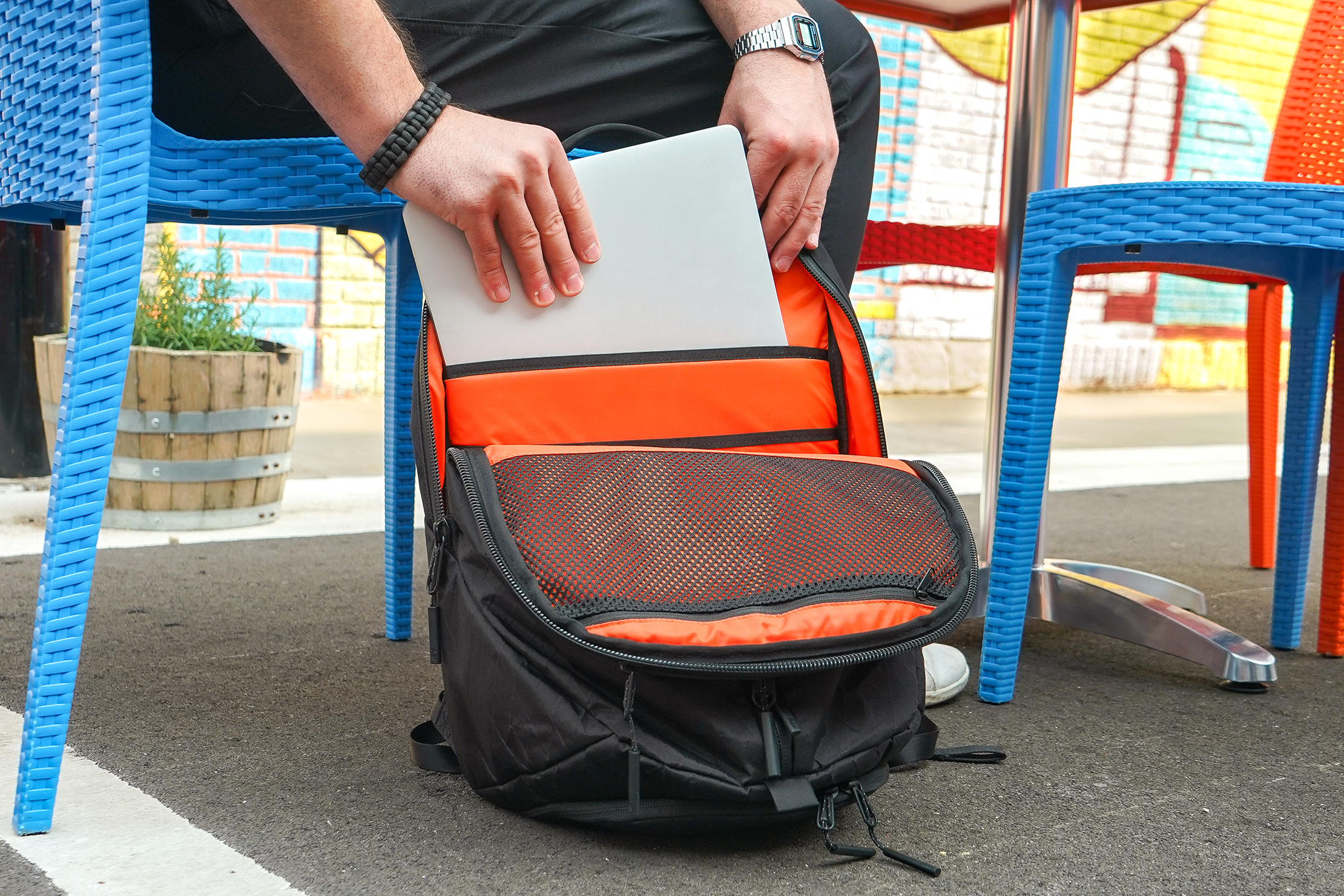
A laptop compartment is a padded section in a bag designed to securely hold and protect a laptop from damage. It fits the laptop size closely to prevent movement and scratches.
What Is A Suspended Laptop Compartment?
A suspended laptop compartment elevates your laptop above the bag’s base. It prevents damage from drops and impacts. This design offers superior protection compared to traditional padded compartments. Suspended compartments enhance safety by reducing direct contact with hard surfaces inside the bag.
What Are The Parts Of A Laptop?
A laptop has external parts like the screen, keyboard, touchpad, ports, and battery. Internal parts include the CPU, RAM, storage, motherboard, and cooling system. These components work together to operate the laptop and enable user interaction.
What Is A Laptop Case Called?
A laptop case is called a laptop sleeve, cover, or hardshell case. It protects the device from scratches and impacts.
Conclusion
A laptop compartment keeps your device safe and secure. It cushions against bumps and scratches. Choosing the right size matters for proper protection. Many bags offer padded or suspended compartments for extra safety. A well-designed compartment helps you carry your laptop with ease.
Remember, protection and convenience go hand in hand. This small feature can make a big difference daily. Understanding its purpose helps you pick the best bag. Stay organized and protect your laptop wherever you go.